
Assessment and Important Information
AAC Competencies
For individuals to be successful AAC users, they need to be proficient in 4 key areas:
-
Operational competence
-
Functional/Social competence
-
Linguistic competence
-
Strategic competence
These 4 competencies support and guide both our teachings and our goal settings.
Operational competence: the skills that are needed in order to use the AAC book or SGD eg. turning it on and off, navigating the system, etc.
Functional/Social competence: the skills that are involved within social communication such as initiating, maintaining, and terminating communicative interactions in appropriate manners.
Linguistic competence: the receptive and expressive language skills required to be able to use the AAC system as well as knowledge of the linguistic code.
Strategic competence: AAC system-based specific skills such as being able to get their communication partner's attention before touching a specific cell on a communication board, repairing communication breakdowns, or seeing if their communication partner comprehends what the AAC user is expressing to them.
Various AAC competencies will be targeted in interventions and the goals you set for/with AAC users can be based on the competencies for that user.
Ready, Set, Goal!
Saltillo created a workbook called "ready, set. goal!" In this workbook, it provides a case study to base all of their examples off of. From there, it dives deep into the 4 competencies (linguistic, operational, social, strategic) by providing the following:
-
definitions and resources
-
core word lists
-
blank and completed AAC goal frameworks
-
needed communication partner skills
-
operational brainstorming tool
-
AAC language lab stages chart
-
strategic brainstorming tool
In the second part of the workbook, it goes into the fine turning and monitoring progress sections where they have:
-
SMART practice
-
SMART guide
-
writing observable measurable goals
-
prompt hierarchy
-
notes & resources
-
data collection sheet examples
-
GAS measuring progress graphs
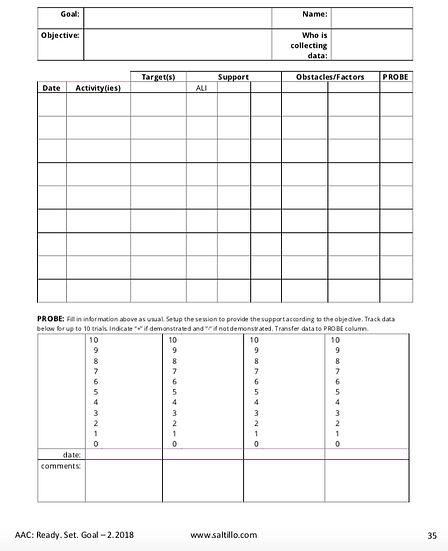
This is the data collection sheet example: This is the AAC goal framework:
To access the "Ready, Set, Goal!" document, please click the button.
Different Communication Functions
Reasons We Communicate
Getting and Giving Information:
-
comment
-
direct
-
describe
-
share news
-
express feelings
-
tell an imaginative story
-
tell a story
-
ask questions
-
discuss
-
give opinions
-
plan
-
explain
Expressing Needs and Wants:
-
make choices
-
protest
-
get attention
-
refuse
-
request
How we Learn to Communicate
Social Interaction:
-
greet
-
ask social questions
-
be polite
-
change topic
-
share about self
-
compliment or flirt
-
tease or joke
-
negotiate
-
set topic
-
start a conversation
-
direct a conversation
-
wrap up a conversation
Strategies to be Better Understood:
-
clarify
-
describe
-
use the alphabet
-
say it differently
-
ask to clarify
-
give a clue



Ability Level Continuum
Tobii Dynavox has created an Ability Level Continuum called the DAGG-2. DAGG stands for Dynamic AAC Goals Grid. It is an assessment document to identify an individual's current skills in AAC. It supports goal making to work towards enhancing the AAC user's communicative independence. In this document, it refers back to the four competencies which are discussed at the top of this page. This document supports goal setting and determining appropriate next steps for interventions.
In the first section of the document, it lays out the five ability levels:
-
Ability Level 1: emergent
-
Ability Level 2: emergent transitional
-
Ability Level 3: context-dependent
-
Ability Level 4: transitional independent
-
Ability Level 5: independent
Each of the ability levels are broken down into five categories and provided with examples. The categories are::
-
understanding
-
expression
-
social interaction
-
literacy skills
-
other
These are ability levels 1 & 2:
This is the ability level summary:
They provide checklists for each ability level in the following areas:
-
linguistic competency
-
operational competency
-
social competency
-
strategic competency
On the checklist they have a "Chain of Cues" prompt code
IC = Indirect Cue
DVC = Direct Verbal Cue
DPC = Direct Pointer Cue
PA = Physical Assistance
The checklist for Linguistic Competency looks like this:


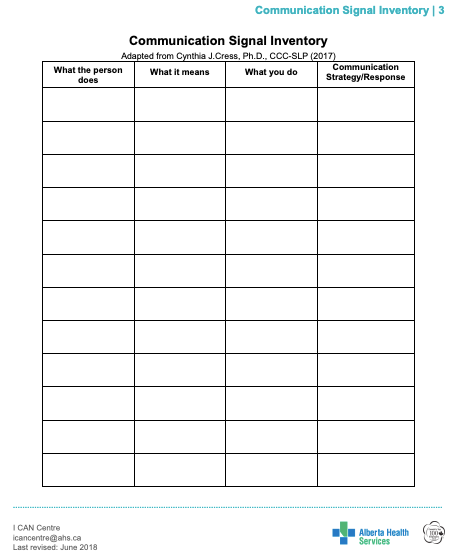
Communication Signal Inventory
Every person is able to communicate, even if they presently have no speech and limited movement. Things such looking, moving, gesturing, making noises are some of the many ways people use signals to communicate. The meaning of some signals can be obvious such as nodding “yes” or “no”, while others may be less clear which may make it difficult to understand. At times, these signals can be misunderstood which can be frustrating.
A “Communication Signal Inventory” is designed to support staff and new people communicating with an individuals who have complex communication needs. The “Communication Signal Inventory” is separated into 4 categories:
-
What the person does (what their signals look like)
-
What it means (what they are trying to tell us by using those signals)
-
What you do (how the communication partner responds)
-
Communication strategy (how will the communication partner models the communication)
-
Ask a yes/no or choice question
-
Model words or phrases on the person’s communication system
-
Model a conventional/functional gesture or facial expression (head shake/nod)
-
Use visuals to support communication (emotion pictures, visual schedule, etc.)
-

Selecting a Specific Device
Selecting an AAC system for your students can be tricky. I highly suggest working closely with a speech language pathologist when making the decision of where to start with your student. This grid below shows low-tech, mid-tech, and high-tech options that are available based on tje number of cells or targets the student can see and/or touch. This grid below is from Alberta Health Service's I CAN Centre's presentation on AAC assessment. The entire presentation is linked in the button below.
Prompt Hierarchy and Data Collection
The prompt hierarchy is used to support learners in developing new skills. You always want to use the least intrusive/invasive prompt. As you can see from the graph below, the prompts range from a pause to a physical prompt or adult completed task.
The graph below is an example of how you can track a student using the prompt hierarchy. On the x-axis are the core words I am choosing to track, and on the y-axis is the prompt hierarchy.

